Network configuration
The network resource puts a proxy between the application and one of the
containers it depends on, so a scenario can make that dependency slow, cut
its connections, make it hang or refuse connections, and then check what the
application does: whether it times out, retries, reconnects, or answers its
own callers sensibly.
It works on TCP, so it works the same for every dependency in a container: Postgres, Redis, Kafka, RabbitMQ, ScyllaDB, MinIO and anything else.
containers:
  postgres:
    image: postgres:16-alpine
    ports: ["5432/tcp"]

app:
  command: ./orders
  env:
    DATABASE_URL: "postgres://test:test@{{.postgres.host}}:{{.postgres.port.5432}}/test?sslmode=disable"

resources:
  orders-db:
    type: postgres
    container: postgres

  postgres-network:
    type: network
    container: postgres
Scenario: an order survives a database failover
  Given "postgres-network" resets connections for "3s"
  When "orders-client" sends "POST" to "/orders" with json:
    """
    {"id": "ord-1", "total": 1999}
    """
  Then "orders-client" response status is "201"
  And "orders-db" table "orders" has "1" rows
Only the application goes through it
With a network resource in front of postgres, the application's
{{.postgres.port.5432}} resolves to the proxy, and every connection it
opens goes through it. tomato's own resources, orders-db above, still
connect to the container directly, so the steps that check a result are never
slowed down or cut off by the faults a scenario applies.
At the start of a run tomato prints where each proxy listens:
Options
| Option | Default | Description |
|---|---|---|
ports |
every port the container exposes | The container ports to stand in front of, like [5432] |
seed |
random, printed at the start of the run | Decides which connections fails "30%" of new connections fails, so a failing run can be repeated with the same seed |
Faults
Every fault lasts until the scenario ends or the network is healed. Each one
also takes for "<duration>", after which it heals by itself, which is what
retry and reconnect code has to survive.
| Step | What the application sees |
|---|---|
adds latency "300ms" |
every response 300 ms late; with jitter "100ms" varies it |
limits bandwidth to "64KB/s" |
a slow link |
stops responding |
a hung dependency: requests are accepted and never answered, until its own timeout |
resets connections |
every connection reset (TCP RST) as soon as it carries data, as in a crash or failover |
refuses connections |
open connections closed and new ones refused, as when the dependency is down; the container keeps running and keeps its data |
flaps every "2s" |
down and up in turn |
fails the next "2" connections |
the next two new connections closed as soon as they open; the ones already open are untouched |
fails "30%" of new connections |
a seeded share of new connections closed as soon as they open |
loses "30%" of the data |
chunks of the stream dropped: stalls and a garbled protocol, not TCP packet loss, which TCP would repair |
is healthy |
every fault turned off |
Faults apply to connections that are already open, such as a connection pool's, as well as to new ones.
Checking what the application did
| Step | Checks |
|---|---|
has seen "3" connections |
how many connections the application opened since the scenario started, failed ones included; a retry or a reconnect is a new one |
sees a new connection within "10s" |
that the application opened a connection after the network last changed: it reconnected |
Scenario: the worker reconnects after the broker drops it
  Given "rabbitmq-network" resets connections for "2s"
  Then "rabbitmq-network" sees a new connection within "15s"
Every scenario starts on a healthy network
Before every scenario the resource turns every fault off and forgets the
connections it counted. It does so before the other resources reset, so
postgres truncates its tables and kafka recreates its topics over a
healthy link.
In the reports
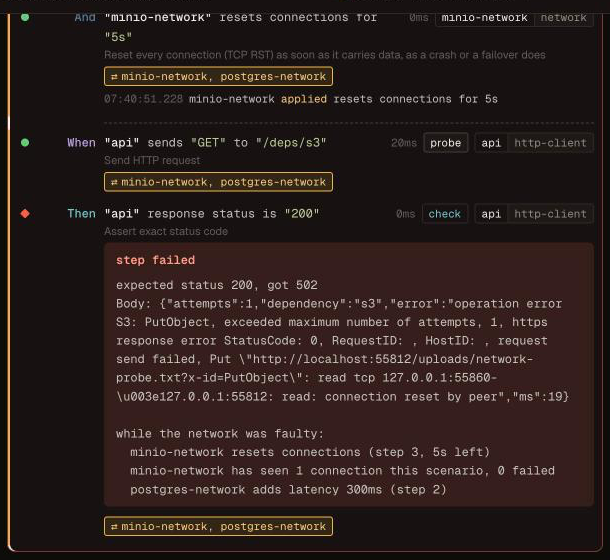
A step that fails while a fault is on says so, after its own error, in every output format:
expected status 200, got 502
while the network was faulty:
  minio-network resets connections (step 3, 5s left)
  minio-network has seen 1 connection this scenario, 0 failed
  postgres-network adds latency 300ms (step 2)
The connection count appears once the network has seen a connection.
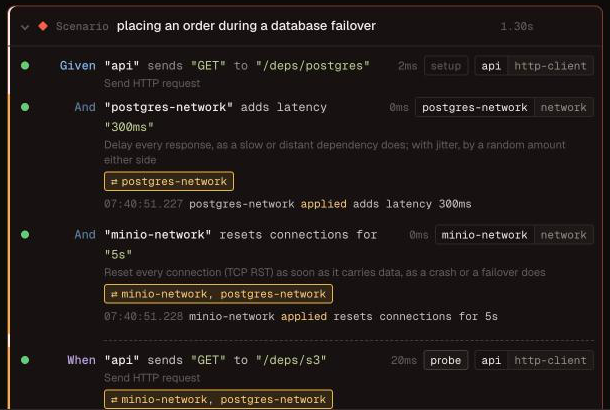
The tomato event stream, which tomato ui reads, carries on each
step_end what the network resources did while the step ran, with
timestamps, and the faults that were on. In tomato ui, a step that ran on a
faulty network has a band and a badge naming the networks (hover it for the
faults), and the step during which a fault was applied, healed or failed a
connection lists it with the time:
Kafka
A Kafka client dials the bootstrap address once and then the address the
broker advertises, so a proxy in front of the bootstrap port alone would be
bypassed after the first request. With the kafka preset,
tomato takes care of it: the broker advertises the proxy to the application,
on the plain listener and the AWS_MSK_IAM one, and a listener of its own to
tomato's kafka resource.
containers:
  kafka:
    preset: kafka

resources:
  orders-events:
    type: kafka
    container: kafka
  kafka-network:
    type: network
    container: kafka
A broker configured by hand has to advertise the proxy itself.
Limits
- The application runs as a local process (
app.command). In container mode it reaches its dependencies over the Docker network, past a proxy in tomato's process, so tomato refuses the combination at the start of a run. - TCP, blind to the protocol. A fault applies to every connection to the
container, so it cannot fail only the
INSERTs or one Kafka topic. For HTTP and gRPC dependencies, the HTTP server and gRPC server stubs answer late or fail per request. - One network resource per container.
The design, and a spike that tried every fault against Postgres, Redis, MinIO, RabbitMQ and Kafka clients, is in Design: network faults.